


WhatsApp contains a feature available on both Android and iOS that allows users to scan any document directly from the mobile application and automatically convert it to a PDF file.
This tool is particularly useful because it facilitates the rapid digitization of documents without the need for external applications.
It allows you to instantly share important files, keep secure digital copies and send official information in seconds.
It also simplifies administrative and academic processes, as all you need to do is take a photo of the document to get a high-quality PDF ready to send or save from the chat itself.

To scan a document to WhatsApp, follow these steps:
- Open the mobile app and show the chat.
- Select the + icon.
- Click Document.
- Select the Scan Document option.
- Take a picture and adjust the size.
- Select Save and then Save.
- Send if necessary.
Scanning documents directly from WhatsApp is especially useful in various situations of daily life, both personal and professional. This feature makes it quick and easy to scan and send documents without the need for additional apps or special equipment like traditional scanners.

For example, this becomes important when you need to immediately share receipts, invoices, cards, contracts or certificates for banking, school or work procedures.
When a digital copy of a document is requested during a video call or chat, the user can instantly scan it and send it in PDF format in just seconds.
This speeds up important procedures and avoids delays caused by the lack of digital versions.
In family situations, the feature is practical for sending medical prescriptions, school permits, reports or assignments from anywhere, allowing you to keep information organized and available in chat. In addition, when converting images to PDF, documents are saved in a better format and with greater security than a simple photo.

This WhatsApp tool also facilitates personal and professional archiving, as each digitized document can be easily stored on the device itself or in the cloud, facilitating future consultations and reducing the need to store physical paper.
Some of the new features of WhatsApp are:
- Filters, effects and backgrounds in video calls
To use filters, effects and backgrounds during WhatsApp video calls, first check if the app is updated. Once you start a video call, tap on the magic wand or effects icon that will appear on the screen.
You can then choose different filters to change the tones of the image, choose a background to replace the real environment, and apply animations or facial features as special effects.
- “I like you” and personal mentions in statuses.
Likes and private mentions tools allow you to seamlessly interact in WhatsApp statuses.
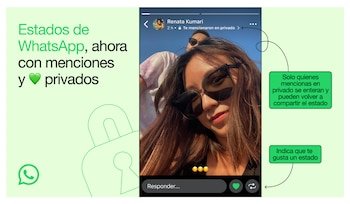
You can show that you like something by clicking on the heart icon; only the creator of the state will see this reaction. Likewise, if you use private mentions, you can include up to five contacts using the “@” symbol when creating your status, thus sending a private notification to those mentioned.
- “Your Turn” sticker in the states.
The Your Turn option in WhatsApp is an interactive status feature that invites your contacts to respond to a topic you bring up. You just need to enter statuses, choose a photo or video and add a sticker “Your turn” to write a slogan or a question.
This way, those who view your status can reply with their own post, creating a collaborative reply thread.
- Improved chat privacy.
This feature increases the security of individual and group chats by preventing messages or files from being shared, downloaded to other devices, or easily exported, thereby increasing the protection and privacy of conversations.


