Google started to include a feature aimed at reducing battery consumption when using real-time navigation. It’s a power-saving mode integrated directly into Google Maps, and for now it’s only available on the Pixel 10 series phones. The tool aims to offer a more efficient user experience for those who depend on the app during long trips or times when it’s not possible to charge the device.
The novelty was the answer to one of the main complaints of users: the rapid discharge of the battery when using the program due to the constant use of GPS, the screen on, and mobile data. With this new setup, The app keeps visuals to a minimum and prioritizes important driving informationwhich allows you to significantly extend the autonomy of the phone.
As Android Authority points out, the power saving mode can add up to four extra hours of use, making things a lot better on the go. The feature only shows the nearest turns and main directions, without showing the full map and other details that often require additional processing.
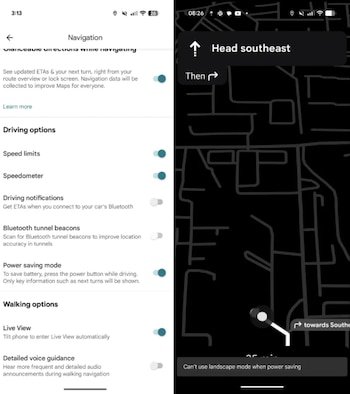
Additionally, Google Maps relies on a recent Android operating system feature called Minimum AOD mode. This option allows you to keep the screen always active during navigation, but with much lower power consumption. To achieve this, The interface is presented in black and white, with very low brightness and no unnecessary animations. The combination of these elements helps preserve the battery without losing control of the car.
At the moment, the tool is gradually being activated on Pixel 10 devices. Google has not yet confirmed whether the mode will reach other models of the brand or phones from third-party manufacturers. Usually, the company releases certain features exclusively on its devices as an initial phase, so further expansion is not excluded.
Users who already have the update can activate the mode from the settings menu Google Maps. The process is simple: just go to Navigation, then Control Options, and finally select Power Saving Mode. After activation, the program will automatically adjust the display mode according to the needs of the route.

This improvement complements a series of updates that Google Maps has received in recent months to optimize the user experience. Among them stand out augmented reality featuresmore accurate indications of appropriate lanes in real time and improved visualization of complex intersections. However, the inclusion of a mode specially designed to extend the autonomy of the phone is one of the most relevant novelties for those who often use the application.
Navigation is one of the most power-hungry tasks on a mobile device.. Keeping GPS active, processing real-time location, updating the map, and turning on the screen create significant consumption. In this context, the new tool aims to offer a practical solution for long journeys, road trips or times when the available battery is limited.
In the absence of official confirmation of its expansion, this feature could be a key resource for improving viewing on a wide variety of devices. Meanwhile, its appearance on the Pixel 10 marks the first step towards a more efficient Google Maps, less demanding on phone resources and better adapted to current mobility needs.