Management of Art connection on Android This is something that Google hasn’t quite optimized for, or at least it seems that way. And it looks like the company is about to give another twist to the current version of its operating system… but not with something new, but with return.
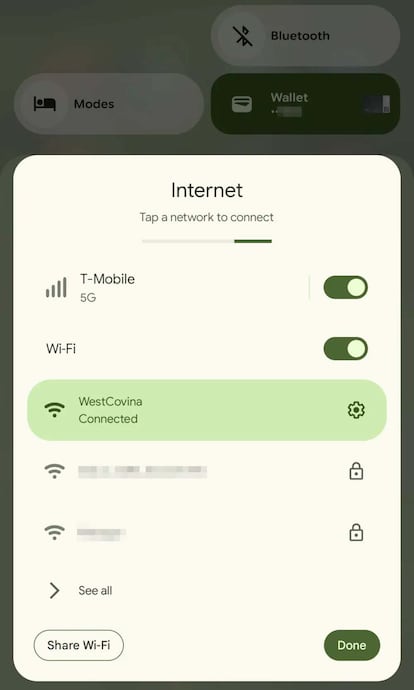
The first thing to remember is that in 2021, Mountain View decided to remove the separate shortcuts for Wi-Fi and mobile data from the Quick Settings panel. Instead, he introduced a single option called Internetwhich was aimed at simplifying the experience and preventing users from accidentally consuming mobile data by forgetting to reactivate wireless access. It sounded good on paper, but in practice it became inefficient for a large number of users.
Before this change, you could simply swipe across the bar and tap once to turn WiFi or mobile data on or off. With Android 12, this quick action has become a process a few steps– Open the Internet panel, select the connection and confirm. For those who frequently set up a connection, this was a setback.
Android 16 QPR2: Shortcuts return
The good news is that this looks set to change soon. According to the source code of the aforementioned test version of the operating system, Google is working on branch of the controversial Internet in two independent controls: Wi-Fi and mobile data. The find shows the following:
- Element for mobile datawhich will allow you to activate or deactivate the connection with one touch.
- Element for wifiwhich adds an interesting feature: pause and scan, designed to improve network management without a complete shutdown.
For now, the second option continues to appear under the Internet label, presumably to ease the transition. Internal notes indicate that the ultimate goal is to return to exclusive Wi-Fi controlas it was before Android 12.
When will this improvement come?
Although the code is already present in the test version of Android 16, the feature remains hidden after the experimental flag -and not active in public betas-. This means users won’t see the new controls on their devices just yet. Google may delay the implementation or even eliminate it, but everything points to the fact that the company is listening to the requests of the community and is looking to regain the lost maneuverability.
When this is finally implemented, it will be a good news for those who have been demanding this return for some time. Reinventing shortcuts will mean a faster and more intuitive experience, especially for those who manage their connections on a daily basis.

Other improvements coming to Android 16
This adjustment is part of a broader system review. Android 16 also works on optimizing the notification panel and quick settings, seeking a balance between functionality and comfort. Even studying a hybrid design which allows you to switch between classic view and split view, adapting to different screen formats, including complex ones.
In addition, evidence of the integration of more intelligent controls, such as capability, was found share WiFi networks between profiles of the same device and advanced options to manage the privacy of the established connection.
The point is that Google is doing what was seen in the test version, Android will restore the feature that many believe essential. It’s not just about convenience: Shortcuts reduce interaction time and increase efficiency, which is key in a system that boasts flexibility and customization. After years of resistance, this change shows that the firm listen to the community, something vital to the development of the platform.