Want to play Fortnite on your Mac but don’t know how? You are not alone. Ever since Apple and Epic Games started their legal battle, playing Fortnite on Mac isn’t as easy as it used to be. Good news? You still have options. Although Mac users can no longer download Fortnite directly, there are some options you can use. So read on and get back into the action as we teach you how to play Fortnite on Mac.
How to play Fortnite on Mac
1. Xbox Cloud Gaming (Free)
Xbox Cloud Gaming is probably the easiest way to get started with Fortnite on your Mac. Although this cloud service is paid, games like Fortnite are completely free to run. All you need to do is link your Epic Games account to Xbox Cloud and follow these steps:
- In your web browser, visit the official Xbox Cloud Gaming website
- Sign in to your Microsoft account or create one if necessary
- Link your Epic Games account to save your progress
- Find Fortnite in your game library and click Play.
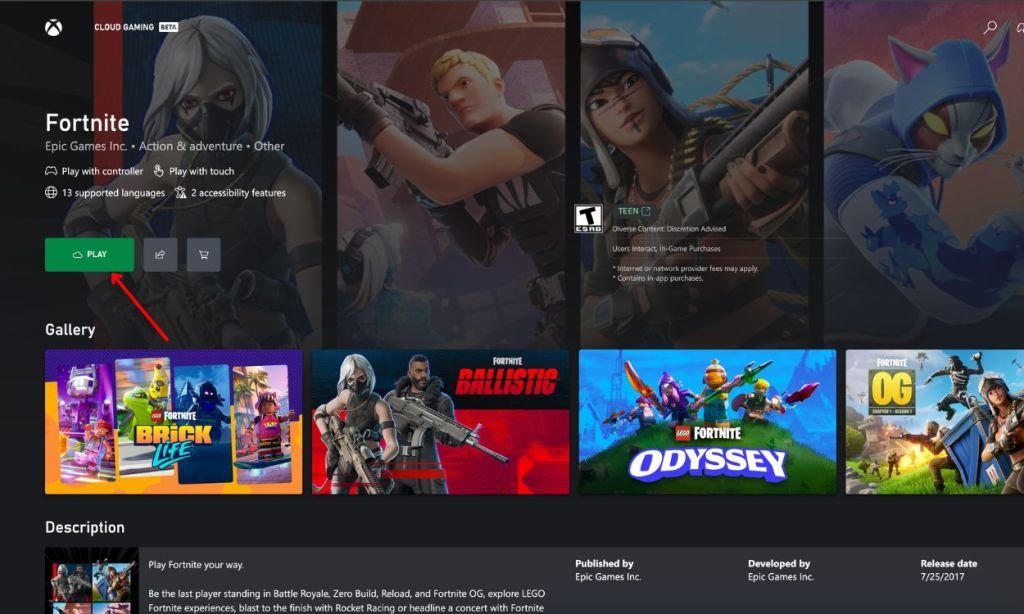
One thing should be noted Currently, Xbox Cloud Gaming only supports controllersrather than a keyboard and mouse. Also, you will need a decent internet connection for smooth gameplay. Fortunately, you don’t need to install anything and you can just play from your browser.
2. Amazon Luna
If you already have an Amazon Prime subscription, then Luna is a great choice as it is included at no additional cost. Luna supports both controller and keyboard/mouse controls, giving you more flexibility in your gameplay. To play Fortnite on Mac using Amazon Luna, follow these steps:
- Visit the official Amazon Luna website and sign in to your Amazon account
- Find Fortnite in the Free game section
- Click Play Now with Prime
- Finally, link your Epic Games account when prompted
If you don’t have Prime, you can sign up for Luna+ separately for $9.99 per monthwith a 7-day free trial available to new users.
3. NVIDIA GeForce Now
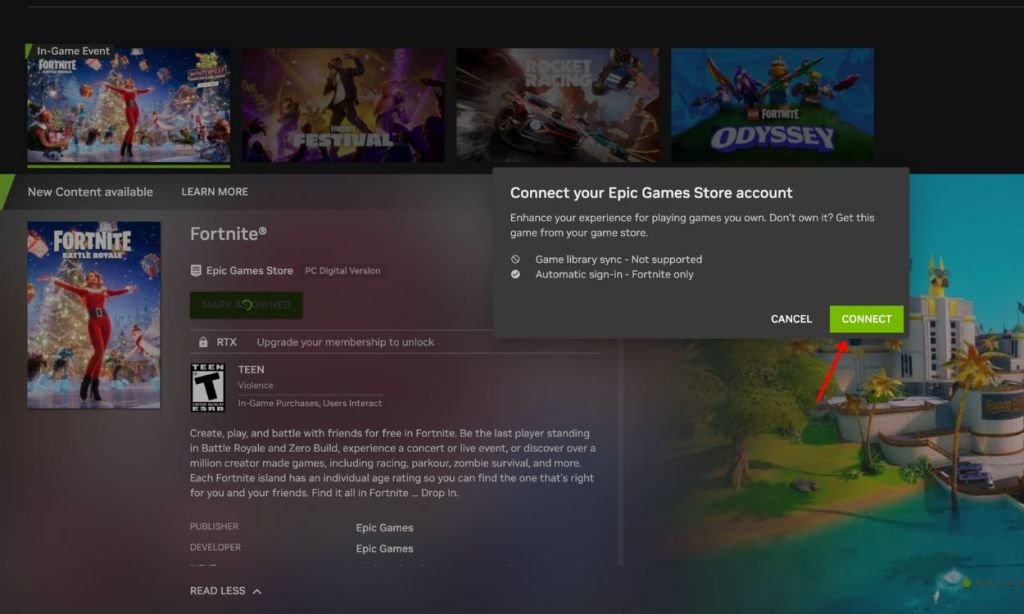
GeForce Now offers both free and paid tiers, making it a flexible option for a variety of budgets. The free tier allows you to play Fortnite without spending anything. To do this, follow these steps:
- Start by visiting the official Nvidia GeForce Now website and sign in to your account
- Click “Connect your Store accounts» on the left side of the page, then select Epic Games
- Follow the prompts to connect your Nvidia and Epic accounts
- Finally, launch Fortnite from your game library
Why can’t you play Fortnite on Mac?
The short version is that Apple stopped Epic Games from developing Fortnite for Mac in 2020 during their legal dispute. Although Fortnite recently returned to iOS devices in the European Union, Mac users around the world still can’t download and play the game directly through the Epic Games Store like before.
With these methods, you can get back to using Fortnite on your Mac despite platform limitations. Cloud gaming options do offer some advantages, such as not having to worry about hardware requirements or large downloads. Choose the method that best suits your preferences and preferences, and you’ll be on your way to matches in no time.