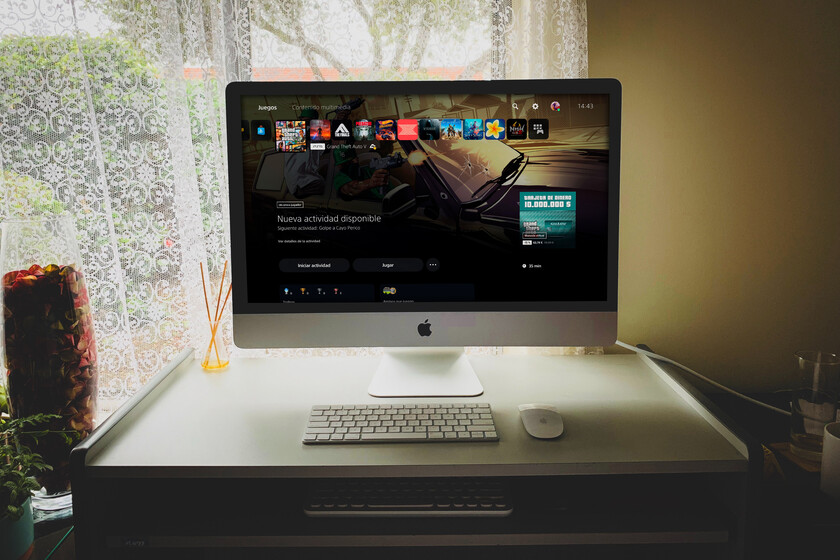
Can i play PS4 with iMac? Yes, of course. What about the Xbox Series X? Well, it requires a number of extra steps, but it is also possible. In this article, I tell you step by step, What apps did I download and what steps did I take to be able to play consoles from my Mac? PlayStation 4, PlayStation 5, Xbox One X and Xbox Series
How to use PlayStation 5 on your Mac
To play PlayStation 5 on your Mac, the first thing you need to consider is the technical requirements. We briefly summarize them here:
- Basic requirements: Update your Mac to one of the macOS Sonoma operating systems or an earlier version, such as macOS Mojave, Catalina, Big Sur, Monterey, or Ventura. On the other hand, you need to have about 45MB of memory, 2GB of RAM or more, and a USB port to connect for the first time
- Game controller– You can use any PS4 and PS5 controller, be it DualSense, DualSense Edge wireless or Dualshock 4 with Bluetooth connection. You can also use other compatible non-proprietary controllers manufactured by third parties.
- Console: For remote play, both PlayStation 4, its Pro version, and PlayStation 5 are compatible. Of course, you need a high-speed Internet connection of at least 5 Mbps. 1080p playback requires a minimum of 15 Mbps over Wi-Fi.
Once these requirements are clear, simple and easy to follow, it’s time to download Remote Play in version 6.5.0. It’s an official Sony app to be able to play the console remotely, so there’s no problem at all.
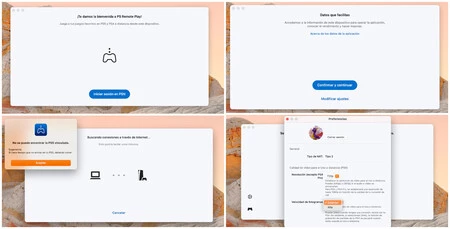
And what are the steps to install and play it? Very easy, although you have to keep in mind that your console must be “open” for remote play. We explain everything to you:
- After downloading the program Sign in to your regular PSN accountthis is the same account you use for your console.
- You will then need to accept the app’s data settings, click “Confirm and continue“as seen in the picture above. Don’t forget to also turn on the console to sync it.
- Finally select the console you want to connect to. A link to the last connected console will appear if you have used this app before, or it will search for other connections.
- And if not, then no problem: the service will start the pairing process by searching for said console on the Internet. In a few seconds you will be connected and ready to play.
When you click on the gear in the app, you can choose the resolution you’ll be playing at and the frame rate. For games like Bloodborne, I recommend playing at high speed, although you will need a very stable connection. If you’re having issues with lag or pixelated games, arcade games can sacrifice a bit of resolution – and more if you’re playing in windowed mode – for smoother streaming.

And what happens if something goes wrong or the console is turned off? You will see a message that the associated console was not found. We tell you how to solve this problem.
How to fix connection failure between Mac and PlayStation 4/5 console
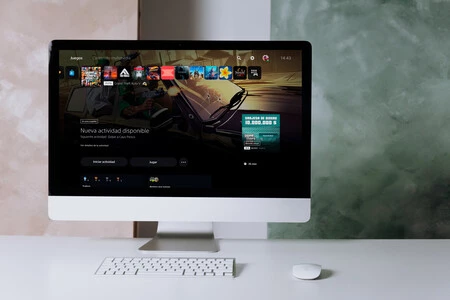
Why does the connection usually not work? Easy because by default PS4 and PS5 don’t have Remote Play enabled
To activate them, follow these steps:
- With your PS4 powered on, go to Settings > System > Remote Play and then activate the Remote Play section. Activate this feature and grant permission from the console itself.
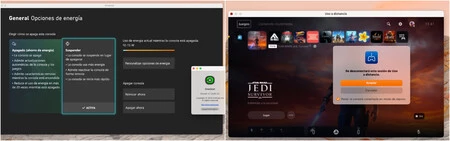
- If you’re using a PS5 and it’s in sleep mode, go to Settingsyou > System > Power saving > Features available in sleep mode.
- Now active Stay connected to the Internet and Activate “turn on PS5 from network” to be able to use it from anywhere. This will allow you to turn on the console and play without having to press the power button on the controller or the console itself. And it simplifies things a lot.

In short, if everything has been connected correctly, you will be able to use the computer located anywhere in your house, connected to the same Wi-Fi network, or anywhere in the world if you connect from the PS Remote mobile app.
How to use Xbox Series X on your Mac
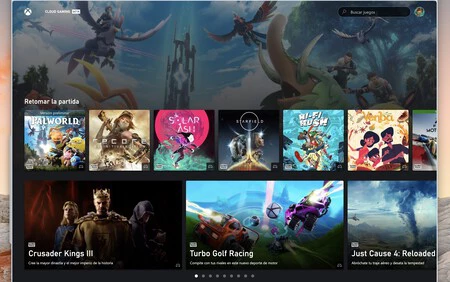
And now we will change the third. How do Microsoft consoles stack up against Apple computers? Regularly, indeed. Today, while waiting for the consolidation of sideloading and the ability to access alternative stores and applications from developers outside the App Store, There is no official app for remote play on Xbox from your Mac. However, there are several solutions. One of them is unofficial, but just as functional.
In this case, as we say, there are two alternatives: if you have a subscription to the Xbox Game Pass service, you can play directly from a compatible and updated browser. The route is as follows https://www.xbox.com/es-ES/play. If you want to play games in Spanish, it’s important to consider this route, with the es-ES, Spanish redirect, because otherwise the games will load and play in English.
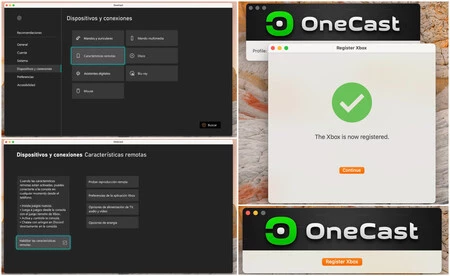
But of course, what happens if you want to play Xbox remotely from your Mac and you don’t have an active subscription, you’re only interested in games hosted on the system or installed on an external hard drive? This is where things get complicated. You can play your Xbox from a Windows 10/11 PC by simply downloading the Xbox app for Windows PC, but there is no official app for macOS.
No problem: there is an unofficial app. Of course, this comes at a cost: a lifetime license currently costs €28.45, but in return you can stream without a problem. Once you’ve downloaded the app, all you have to do is set up your console to pair both your Mac and Xbox.

To do this, follow these steps:
- Enter Settings from the console and go to “Devices and connections‘
- Then type ‘Remote control functions‘
- And finally, Enable Remote Features. From here you can do connection test to measure latency, NAT type and measure overall performance, depending on whether you’re connected to Wi-Fi or wired Ethernet, or whether you need a firmware update to be able to play.
OneCast in version 2.1 allows you to play on any Xbox One, One S/X or Series S/X console from your Mac and does not have a number of special requirements like PlayStation Remote Play. to have It even has an app for Apple TV and it’s the most stable of all the ones I’ve tried, so it’s the only one I’d recommend. And with it, I spent the entire Halo Master Chief collection playing with a Mac, which they say was early.
In Applesfera | 11 best games for ipad
In Applesfera | Apple Arcade Step-by-step guide: Questions and answers about this ad-free game subscription