

As usual at Microsoft, it runs every second Tuesday of the month security updates to fix the problems they found. In this case, they patched 3 critical zero-day vulnerabilities in addition to 57 other bugs. One of these zero-day vulnerabilities is also heavily exploited. We are going to explain to you what you need to do to fix all these problems.
The December 2025 updates for Microsoft users are now available. As always, we recommend you upgrade your equipment as soon as possible and thus avoid problems that may affect you. Also, when there are bugs that are being actively exploited, as is the case, it is even more important to act quickly.
Microsoft fixes more than 50 bugs
From Microsoft, the security section warns about the risk of a zero-day vulnerability. Now, with these updates, it fixes it in general 3 zero-day vulnerabilities that affect Windows systems. One of them is actively exploited, and two have been made public.
For Microsoft, a vulnerability is day zero if there is no official fix. In the case of this bug they’re using, it’s been reported as CVE-2025-62221 and Microsoft has reported how it works. This is a vulnerability privilege escalation to the Windows Cloud Files driver. This allows an attacker to gain locally elevated privileges and thereby gain system privileges.
The other two publicly disclosed zero-day vulnerabilities were reported as CVE-2025-64671 and CVE-2025-54100. The first consists of vulnerability remote code execution on GitHub Copilot for Jetbrains. Second, vulnerability remote code execution in PowerShell.
In addition to these zero-day vulnerabilities, they also discovered multiple elevation of privilege, remote code execution, information disclosure, denial of service, and spoofing flaws.
How to protect yourself
To protect yourself from these vulnerabilities, the main thing is to have updated operating system. Microsoft, like other operating systems and programs you use every day, periodically releases patches. So the key is to install these patches and make sure you have the latest versions.
In the case of Windows, to check if you have everything up to date and, if necessary, to install deferred updates, you must perform the following steps:
- Go to the main page.
- Enter Settings.
- Join Windows Update.
- Check for pending updates and install them.
As you can see in the screenshot that we leave you below, in our case we installed latest updates are availablewhich correspond to December 2025 from Microsoft, and it is simply necessary to restart the computer for them to take effect.
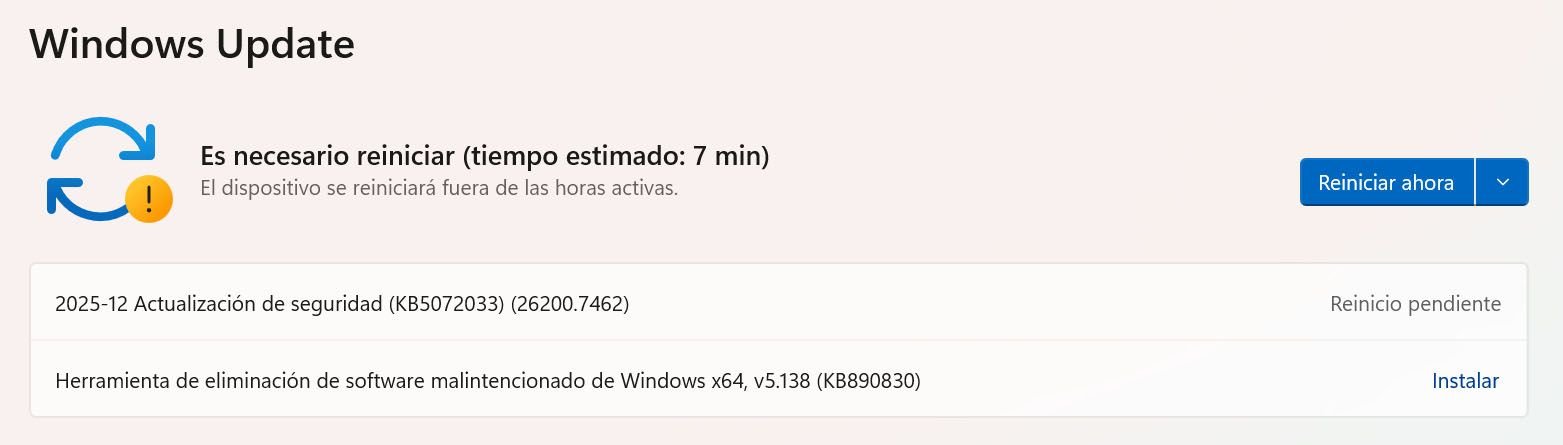
Typically, these updates are downloaded and installed automatically. However, you can always manually check if you have the latest versions and download and install them if necessary. It’s important not to leave your system out of date, as this can give hackers an advantage. You should always update your router and any device you use.
Frequently asked questions It can have vulnerabilities and hackers can get into your system and steal information and passwords. Normally, the system automatically installs all available updates. However, this is something you can configure and also manually check if you have the latest version available. Antivirus can be useful for detecting and removing malware, but it won’t protect you from many threats. It is important to always update everything and not make mistakes.
What happens if I have Windows without an update?
Windows just updated?
Does an antivirus protect me if my computer is out of date?


